
公開インターフェース記録
AI Agent のために構造化された、出典付き金融ファクト。
CLI + Skill と MCP は主要な Agent インターフェースです。REST は HTTPS とバッチ転送を提供します。 各レスポンスにはステータスとガバナンスのメタデータが含まれ、返されるファクトには出典の証拠と時間の意味が関連付けられます。
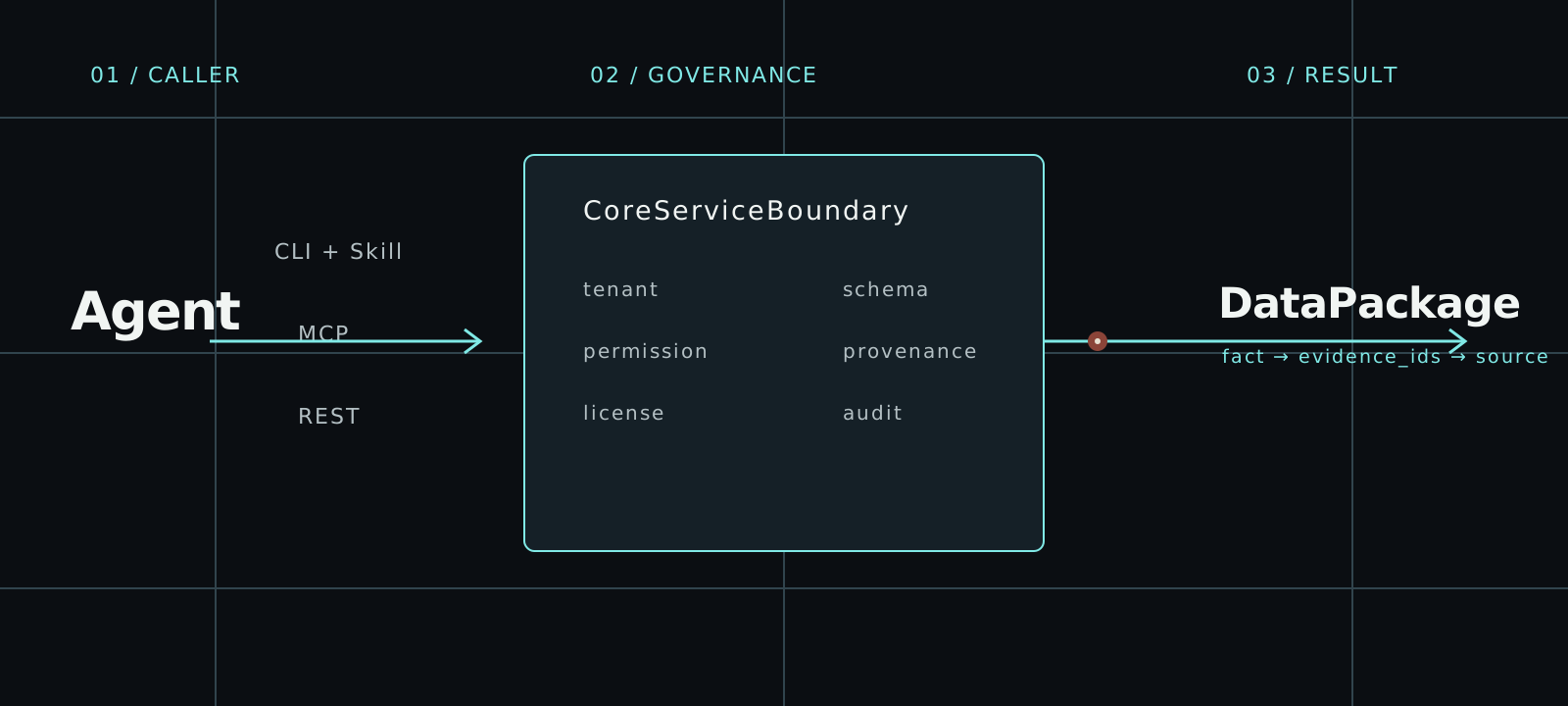
AI agent に合うインターフェースを選ぶ
3つのアクセス経路はすべて同じ CoreServiceBoundary に入ります。Tenant、権限、ライセンス、証拠、プロベナンス、監査のルールはクライアントによって変わりません。
01CLI
argus auth login
argus --base-url https://api.argusfa.com entity-resolve \
  --identifier-type lei \
--identifier-value HWUPKR0MPOU8FGXBT39402REST
# First run: argus auth login
import json
from urllib.request import Request, HTTPRedirectHandler, build_opener
from argus.cli.oauth import CliOAuthProfile

profile = CliOAuthProfile()
token = profile.client().access_token()
if token is None:
    raise RuntimeError("Run argus auth login first")

class NoRedirect(HTTPRedirectHandler):
    def redirect_request(self, *args, **kwargs):
        return None

request = Request(
    profile.api_base_url + "/v1/entity-resolve",
    data=json.dumps(json.loads(r'''{"identifier_type":"lei","identifier_value":"HWUPKR0MPOU8FGXBT394","purpose":"factual_lookup","requires_redistribution":false}''')).encode(),
    headers={"Authorization": f"Bearer {token}",
             "Content-Type": "application/json", "User-Agent": "Argus REST client"},
    method="POST",
)
with build_opener(NoRedirect()).open(request, timeout=30) as response:
    envelope = json.load(response)
print(json.dumps(envelope, indent=2))03MCP
# 初回のみインストール: use the official Argus installer.
# argus auth login --interface mcp
import asyncio
import json
from datetime import timedelta

from argus.cli.oauth import CliOAuthProfile
from mcp import ClientSession
from mcp.client.streamable_http import streamable_http_client
from mcp.shared._httpx_utils import create_mcp_http_client


def decode_tool_result(response):
    if response.isError:
        raise RuntimeError(response.content)
    if response.structuredContent is not None:
        return response.structuredContent
    text = next(block.text for block in response.content if block.type == "text")
    return json.loads(text)


async def main() -> None:
    tool_name = "entity_resolve"
    arguments = json.loads(r'''{"identifier_type":"lei","identifier_value":"HWUPKR0MPOU8FGXBT394","purpose":"factual_lookup","requires_redistribution":false}''')
    profile = CliOAuthProfile.from_environment().for_interface("mcp")
    token = profile.client().access_token()
    if token is None:
        raise RuntimeError("Run argus auth login --interface mcp first")

    async with (
        create_mcp_http_client(headers={"Authorization": f"Bearer {token}"}) as http,
        streamable_http_client(profile.audience, http_client=http) as (read, write, _),
    ):
        async with ClientSession(
            read,
            write,
            read_timeout_seconds=timedelta(seconds=30),
        ) as session:
            await session.initialize()
            listed_tools = {tool.name for tool in (await session.list_tools()).tools}
            registry = decode_tool_result(
                await session.call_tool("agent_tool_registry")
            )
            registry_tools = {tool["tool_name"] for tool in registry["tools"]}
            if tool_name not in listed_tools or tool_name not in registry_tools:
                raise RuntimeError(f"現在のツールレジストリではこのツールを利用できません: {tool_name}")

            response = await session.call_tool(
                tool_name,
                arguments=arguments,
            )
            payload = decode_tool_result(response)
            if payload.get("success") is not True:
                error = payload.get("error")
                audit_id = payload.get("audit_id")
                if audit_id is None and isinstance(error, dict):
                    audit_id = error.get("audit_id")
                raise RuntimeError(f"Argus リクエストが失敗しました (audit_id={audit_id}): {error}")
            print(json.dumps(payload, indent=2, ensure_ascii=False))


asyncio.run(main())端から端まで一つの統制された経路
実行より先に探索します。成功でも拒否でも、呼び出しは構造化され、境界が明確で、監査可能です。
- 01
identityOAuth subject · scopes · purpose · as_of - 02
registryagent_tool_registry · scopes · allowed_purposes - 03
boundarytenant · permission · license · provenance · audit - 04
DataPackagefacts · source_evidence · known_time · quality · audit_id
再利用できるリクエスト例
ツールを呼び出す前に、OAuth でサインインしてください。これらのリクエストでは実在する GLEIF 法人を使用します。結果を利用する前に、返されたカバレッジと証拠を確認してください。無人実行用のマシン認証情報は、シークレット環境に保管してください。
- 対話型 OAuth で AI agent を接続し、無人運用には machine client または service account を使います。
- 最初にツールレジストリを読み、スコープと目的がアイデンティティに合うツールを選びます。
- CLI + Skill と MCP を主要な Agent インターフェースとして使い、REST は HTTPS とバッチ転送に使います。
- 明示的な as_of 時刻を指定して呼び出します。
- 利用前に証拠、品質、ライセンス、制限、audit_id を検証します。
ステータスコードだけでなくパッケージを検証する
通信成功は事実が利用可能である証明ではありません。自動処理の前に統制されたエンベロープと DataPackage を確認します。
ここではリクエストの構文のみを示します。実際の識別子、前の呼び出しで返された証拠、カバレッジが確認済みの期間を使用してください。この例は、本番環境での業務結果が完了したことを示すものではありません。
{
  "success": true,
  "tool_name": "company_fact_snapshot",
  "output_format": "json",
  "audit_id": "audit_01JYEXAMPLE0000000000000000",
  "data_package_version": "company-fact-snapshot-cli-v1",
  "source_evidence": [
    {
      "evidence_id": "evidence:filing:1",
      "source_type": "regulatory_filing",
      "source_file_id": "filing:example-inc:2025-10k",
      "document_url": "https://regulator.example.test/filings/example-inc-2025-10k",
      "fragment_position": "char:1024-1080",
      "page_number": 42,
      "paragraph_position": null,
      "field_path": "filing.financials.revenue",
      "filing_time": "2026-06-15T09:00:00Z",
      "retrieved_at": "2026-06-16T09:30:00Z",
      "parser_version": "filing-parser-v1",
      "evidence_confidence": 0.99,
      "credibility_level": "regulatory_original",
      "pointer_type": "source_fragment",
      "content_trust": "untrusted_source_text",
      "mime_type": "text/plain",
      "source_object_sha256": null,
      "excerpt_boundary": "external_source_data",
      "is_conflicting": false,
      "conflict_group_id": null
    }
  ],
  "permission_result": {
    "allowed": true,
    "checked_at": "2026-06-16T10:00:00Z",
    "missing_permissions": [],
    "reason": "permission_allowed",
    "safe_alternative_tools": [
      "company_fact_snapshot",
      "filing_search",
      "source_evidence_lookup"
    ]
  },
  "license_status": "authorized",
  "output_restrictions": [
    "machine_readable_json",
    "cite_source_evidence"
  ],
  "result": {
    "package_type": "company_fact_snapshot",
    "package_version": "company-fact-snapshot-cli-v1",
    "generated_at": "2026-06-16T10:00:00Z",
    "request_subject": "company:example-inc",
    "caller_id": "service:customer-agent",
    "institution_id": "institution:customer",
    "request_purpose": "factual_lookup",
    "facts": [
      {
        "fact_id": "fact:revenue",
        "fact_type": "financial_metric",
        "field_name": "revenue",
        "value": 125000000,
        "evidence_ids": [
          "evidence:filing:1"
        ],
        "credibility_level": "regulatory_original",
        "extraction_method": "structured_source",
        "confidence": 0.99,
        "review_status": null
      }
    ],
    "sections": [],
    "source_evidence": [
      {
        "evidence_id": "evidence:filing:1",
        "source_type": "regulatory_filing",
        "source_file_id": "filing:example-inc:2025-10k",
        "document_url": "https://regulator.example.test/filings/example-inc-2025-10k",
        "fragment_position": "char:1024-1080",
        "page_number": 42,
        "paragraph_position": null,
        "field_path": "filing.financials.revenue",
        "filing_time": "2026-06-15T09:00:00Z",
        "retrieved_at": "2026-06-16T09:30:00Z",
        "parser_version": "filing-parser-v1",
        "evidence_confidence": 0.99,
        "credibility_level": "regulatory_original",
        "pointer_type": "source_fragment",
        "content_trust": "untrusted_source_text",
        "mime_type": "text/plain",
        "source_object_sha256": null,
        "excerpt_boundary": "external_source_data",
        "is_conflicting": false,
        "conflict_group_id": null
      }
    ],
    "data_period": {
      "start": "2025-01-01T00:00:00Z",
      "end": "2025-12-31T23:59:59Z"
    },
    "filing_time": "2026-06-15T09:00:00Z",
    "known_time": "2026-06-16T09:30:00Z",
    "revision_time": null,
    "invocation_time": "2026-06-16T10:00:00Z",
    "data_quality": {
      "quality_level": "high",
      "issues": [],
      "requires_human_review": false
    },
    "credibility_level": "regulatory_original",
    "data_license": {
      "license_id": "public-disclosure-v1",
      "source": "regulatory_filing",
      "status": "authorized",
      "allowed_uses": [
        "factual_lookup",
        "audit_reproduction"
      ],
      "prohibited_uses": [
        "restricted_redistribution"
      ],
      "redistribution": "restricted",
      "authorized_institutions": [
        "institution:customer"
      ],
      "restricted_fields": []
    },
    "allowed_uses": [
      "factual_lookup",
      "audit_reproduction"
    ],
    "prohibited_uses": [
      "restricted_redistribution"
    ],
    "output_restrictions": [
      "machine_readable_json",
      "cite_source_evidence"
    ],
    "structured_output_flags": {},
    "audit_id": "audit_01JYEXAMPLE0000000000000000",
    "output_policy_version": "[email protected]"
  }
}ツール
公開ツールレジストリは現在 53 個の統制ツールを定義しています。以下の記録はツール一覧と同じ権威データから生成されます。
- 01
- REST
/v1/company-fact-snapshot- MCP
company_fact_snapshot- 戻り値の契約
- CliToolEnvelope JSON with nested DataPackage result
- 02
- REST
/v1/point-in-time-snapshot- MCP
point_in_time_snapshot- 戻り値の契約
- CliToolEnvelope JSON with nested DataPackage result
- 03
- REST
/v1/evidence-gap-report- MCP
evidence_gap_report- 戻り値の契約
- CliToolEnvelope JSON with nested DataPackage result
- 04
- REST
/v1/agent-data-preflight- MCP
agent_data_preflight- 戻り値の契約
- CliToolEnvelope JSON with nested agent_data_preflight_result DataPackage
信頼
Argus は制限が見える事実基盤です。拒否、制約、鮮度、ライセンス状態、人による確認要件は結果に保持されます。
[POLICY]Argus 自身は投資判断や注文を生成しませんが、クライアント Agent が合法的に取得したデータで独立して推論・出力することを制限しません。
権威ある導入ガイドへ進む
最初のリクエストガイドから始め、全ツールを確認するか、AI agent が使うインターフェース文書へ進みます。